
If you have ever wondered why your Shopify store is invisible on Google while your competitors seem to attract customers effortlessly, the answer almost always comes down to one thing: keyword research for Shopify. Getting keyword research right is the single most powerful SEO action you can take to grow organic traffic, increase sales, and build a sustainable ecommerce business.
This complete beginner’s guide will walk you through exactly how to do keyword research for Shopify step by step — from picking the right tools to mapping keywords to your product pages, collection pages, and blog content. By the time you finish reading, you will have a clear, actionable roadmap to rank your Shopify store on Google in 2026.
Quick Answer: Keyword research for Shopify means finding the exact words and phrases your target customers type into Google when looking for products like yours — then strategically using those terms across your store pages, product descriptions, and blog posts to rank higher in search results.
Table of Contents
What Is Keyword Research for Shopify and Why Does It Matter?
Understanding the 3 Types of Keywords Every Shopify Store Needs
Key Metrics: Search Volume, Keyword Difficulty, and Search Intent
Best Keyword Research Tools for Shopify (Free and Paid)
Step-by-Step: How to Do Keyword Research for Shopify
How to Map Keywords to Your Shopify Store Pages
On-Page SEO: Where to Place Keywords in Your Shopify Store
Common Keyword Research Mistakes Shopify Owners Make
- Frequently Asked Questions
1. What Is Keyword Research for Shopify and Why Does It Matter?
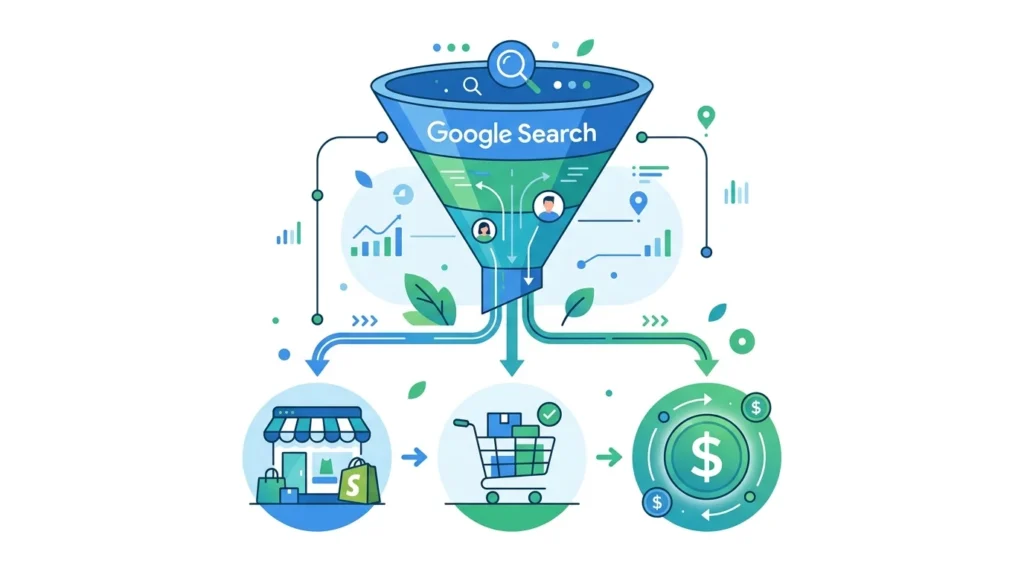
Keyword research for Shopify is the process of discovering the specific search terms your ideal customers use when they look for products on Google, Bing, or any other search engine. It tells you what people want, how many people want it, and how hard it is to rank for that search term.
Without proper keyword research for Shopify, you are essentially building your store in the dark. You might write beautiful product descriptions, add stunning images, and publish engaging blog posts — but if those pages are not optimized for the terms your customers are actually searching, Google will never send you traffic.
The Business Case for Shopify Keyword Research
Consider these facts that make a compelling case for investing in keyword research:
- Organic search drives approximately 43% of all ecommerce traffic— making it the single largest acquisition channel for online stores.
- Long-tail keywords, which are the highly specific 3-to-5-word phrases keyword research uncovers, convert at 5 times the rateof short, broad search terms.
- Shopify stores that publish keyword-optimized blog content generate up to 67% more leadsthan those that rely solely on product and collection pages.
- A well-executed keyword research for Shopifystrategy can deliver measurable organic traffic results in as little as 3 to 6 months for new stores targeting low-competition terms.
In short, keyword research for Shopify is not optional — it is the foundation of every other SEO action you take.
2. Understanding the 3 Types of Keywords Every Shopify Store Needs
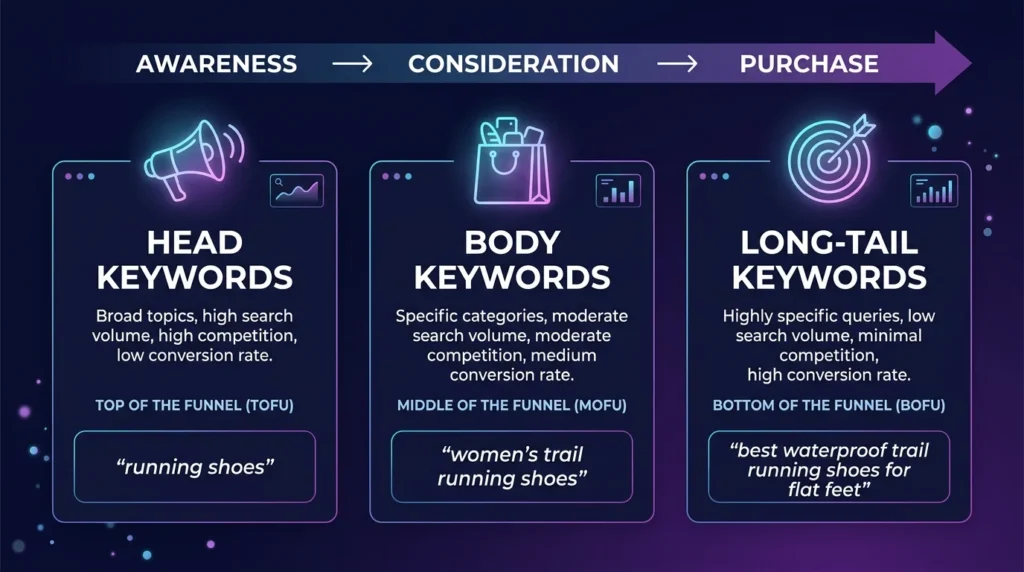
Before you open a single spreadsheet or tool, you must understand that not all search terms are created equal. Mastering How to Do Keyword Research for Shopify requires categorizing keywords based on where a customer stands in their buying journey. If you target the wrong type of keyword on the wrong page, you’ll end up with high bounce rates and zero sales.
Every successful Shopify SEO strategy relies on a balanced mix of these three categories:
| Keyword Type | Example | Search Intent | Best Used For |
| Head Keywords | Running shoes | Broad / Informational | Brand awareness, Homepage |
| Body Keywords | Women’s trail running shoes | Navigational / Commercial | Collection pages, Category pages |
| Long-Tail Keywords | Best waterproof trail running shoes for flat feet | Transactional / High Intent | Product pages, Blog posts |
Head Keywords
Head keywords are the “heavy hitters”—short, one-to-two-word terms with massive search volume. While they look tempting, they are incredibly competitive and often have “fuzzy” intent. Someone searching for “shoes” might be looking for a definition, a history of footwear, or a specific local store. For most merchants learning How to Do Keyword Research for Shopify, these terms should be used sparingly, primarily for high-level brand positioning on the homepage.
Body Keywords
Body keywords are the sweet spot for your collection pages. These 2-to-3-word phrases, such as “women’s trail running shoes,” show a much clearer commercial intent. The user has narrowed down what they want but is still browsing for the right style or price. Developing a process for How to Do Keyword Research for Shopify that focuses on these terms ensures your category pages act as effective landing spots for “comparison shoppers.”
Long-Tail Keywords
Long-tail keywords are the crown jewels of e-commerce. These are highly specific phrases of four or more words that signal a customer is ready to pull out their credit card. As AI search and voice assistants become more prevalent in 2026, long-tail queries like “best waterproof trail running shoes for flat feet” are more valuable than ever.
Targeting these with your product pages and blog posts is the most effective way to see results when you are first figuring out How to Do Keyword Research for Shopify. They may have lower individual volume, but their conversion rates are significantly higher because you are providing the exact answer to a very specific need.
3. Key Metrics to Evaluate During Keyword Research for Shopify

Every keyword research tool will show you several metrics. Knowing which ones to focus on will save you hours of wasted effort. Here are the three most important metrics for keyword research for Shopify:
Search Volume
Search volume tells you how many times per month a keyword is searched globally or in a specific country. Higher is generally better, but volume alone is not enough. A keyword with 10,000 monthly searches is worthless if you have no chance of ranking for it. For new Shopify stores, focus on keywords with 100 to 2,000 monthly searches — these are easier to rank for and still deliver meaningful traffic.
Keyword Difficulty (KD)
Keyword difficulty is a score — usually from 0 to 100 — that estimates how hard it will be to appear on page one of Google for that keyword. The score is based on the authority of pages currently ranking, their backlink profiles, and content depth. For keyword research for Shopify, target these ranges:
KD Score | Difficulty Level | Recommended For |
0 – 20 | Very Easy | Brand new Shopify stores (under 6 months old) |
21 – 35 | Easy | Stores with some content and a few backlinks |
36 – 55 | Medium | Established stores with good domain authority |
56 – 75 | Hard | Authority stores with strong backlink profiles |
76 – 100 | Very Hard | Enterprise-level brands only |
Search Intent
Search intent is arguably the most important metric of all. It describes what the searcher actually wants to accomplish. Google has become very good at matching intent to content, so if you target a keyword with the wrong type of page, you will not rank regardless of how well optimized your page is. The four types of intent are:
- Informational— The user wants to learn something. Example: ‘how to clean suede shoes.’ Target these with blog posts.
- Navigational— The user is looking for a specific website or brand. Example: ‘Nike running shoes.’ Hard to compete with unless you are that brand.
- Commercial— The user is researching before buying. Example: ‘best trail running shoes 2026.’ Target these with comparison blog posts or collection pages.
- Transactional— The user is ready to buy. Example: ‘buy waterproof trail running shoes.’ Target these with product pages and collection pages.
4. Best Keyword Research Tools for Shopify (Free and Paid)

You do not need to spend a fortune to do effective keyword research for Shopify. There are excellent free tools that will get you started, and premium tools that will give you a serious competitive edge as your store grows.
Tool | Price | Best For | Standout Feature |
Google Keyword Planner | Free | Beginners, volume data | Direct Google data, free forever |
Google Search Console | Free | Tracking existing rankings | Shows real clicks and impressions |
Ubersuggest | Free / $29/mo | Idea generation | Great free tier for new stores |
SEMrush | $140/mo | Advanced research | 25+ billion keyword database |
$129/mo | Competitor analysis | Best backlink + keyword combo | |
KWFinder (Mangools) | $29/mo | Long-tail hunting | Easiest KD scoring for beginners |
AnswerThePublic | Free / $9/mo | Question keywords | Maps People Also Ask queries |
Pro Tip: Start with Google Keyword Planner and Google Search Console — both are free and powered by real Google data. Once your store generates consistent traffic, upgrade to KWFinder or SEMrush to scale your keyword research for Shopify.
5. Step-by-Step: How to Do Keyword Research for Shopify

Now that you understand the theory, let us walk through the exact step-by-step process for doing keyword research for Shopify from scratch.
Step 1 — Brainstorm Seed Keywords
Seed keywords are the broad starting points from which all your other keyword ideas grow. To find yours, think about your products from your customer’s perspective. Ask yourself:
- What problem does my product solve?
- What words would a first-time buyer type into Google?
- What materials, sizes, colors, or features make my product unique?
For example, if you sell handmade soy candles, your seed keywords might be: ‘soy candles,’ ‘natural candles,’ ‘scented candles,’ ‘non-toxic candles,’ and ‘handmade candles.’
Step 2 — Expand with a Keyword Research Tool
Take each seed keyword and run it through a keyword research tool or use a free keyword idea generator to quickly expand your list with relevant search terms.. The tool will return dozens or hundreds of related keyword ideas, complete with search volume and difficulty scores. Export these to a spreadsheet and collect all relevant results.
Step 3 — Use Google Autocomplete and People Also Ask
Type each seed keyword into Google’s search bar without pressing Enter. The autocomplete suggestions that appear are real searches made by real people — these are often excellent long-tail keyword ideas with moderate volume and low competition. Also scroll down to the ‘People Also Ask’ box and the ‘Related Searches’ section at the bottom of the page. Both are goldmines for keyword research for Shopify content ideas.
Step 4 — Analyse Your Competitors’ Keywords
One of the fastest shortcuts in keyword research for Shopify is to study what your competitors are already ranking for. Enter a competitor’s domain into SEMrush’s Domain Overview or Ahrefs’ Site Explorer. Filter for keywords in positions 4 through 15 — these are terms your competitor ranks for but not strongly, giving you a realistic opportunity to outrank them with better-optimized content.
Step 5 — Filter and Prioritize Your Keyword List
By now you should have a large list of keyword ideas. Time to filter. Apply these three criteria to narrow it down to your most valuable targets:
- Relevance— Does this keyword directly relate to what you sell? If not, remove it.
- Volume— Does it have enough searches to be worth targeting? For new stores, aim for 100 to 2,000 monthly searches.
- Difficulty— Can you realistically rank for it? For new stores, stick to KD 0 to 30.
Priority Tier | Volume Range | KD Range | Action |
Tier 1 — Quick Wins | 100 – 1,000/mo | 0 – 25 | Target immediately with product and blog pages |
Tier 2 — Growth Keywords | 1,000 – 5,000/mo | 25 – 45 | Target after building some authority (3–6 months) |
Tier 3 — Authority Keywords | 5,000+/mo | 45+ | Long-term goal, requires strong backlink profile |
Step 6 — Group Keywords into Topic Clusters
Modern keyword research for Shopify is not about targeting one keyword per page. Google now understands topics, not just individual phrases. Group related keywords together and plan content that covers a topic comprehensively. For example, a cluster around ‘soy candles’ might include: ‘soy candles benefits,’ ‘how to make soy candles at home,’ ‘best soy candles for relaxation,’ and ‘soy candles vs paraffin candles.’ A pillar blog post covering the main topic, supported by shorter focused posts, builds topical authority that helps every page in the cluster rank higher.
6. How to Map Keywords to Your Shopify Store Pages
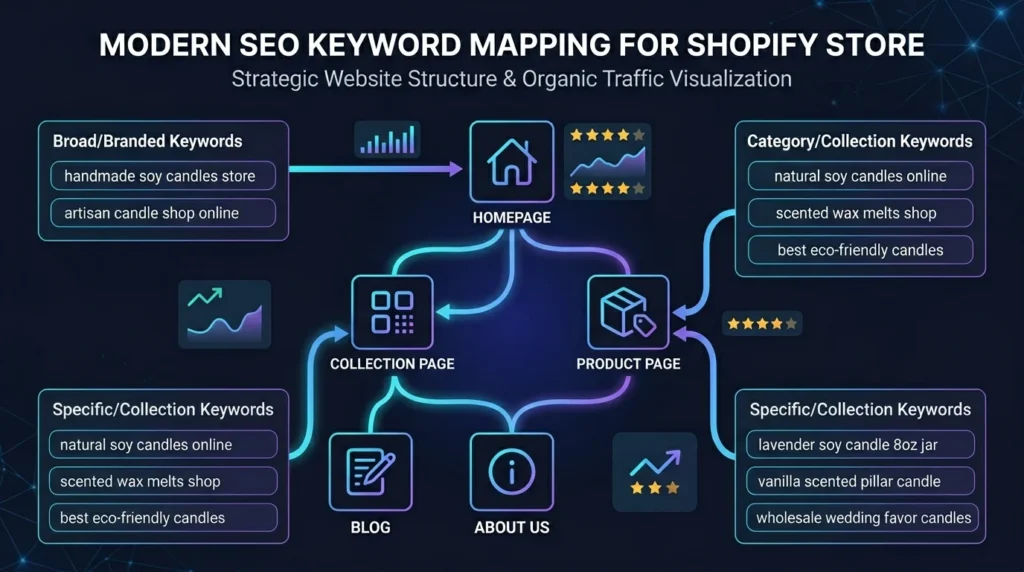
Once you have your keyword list, you need to match each keyword to the right type of page in your Shopify store. This is called keyword mapping, and it is one of the most overlooked steps in keyword research for Shopify.
Shopify Page Type | Best Keyword Type | Search Intent | Example |
Homepage | Brand + category head term | Navigational | ‘handmade soy candles store’ |
Collection / Category Page | Category body keyword | Commercial | ‘natural soy candles online’ |
Product Page | Specific product long-tail | Transactional | ‘lavender soy candle 8oz jar’ |
Blog Post | Informational / question keyword | Informational | ‘how long do soy candles burn’ |
About Page | Brand + trust keywords | Navigational | ‘about [brand name] candles’ |
Important Rule: Never target the same keyword on two different pages — this is called keyword cannibalization and causes your pages to compete against each other in Google’s results, ultimately hurting both rankings.
7. On-Page SEO: Where to Place Keywords in Your Shopify Store
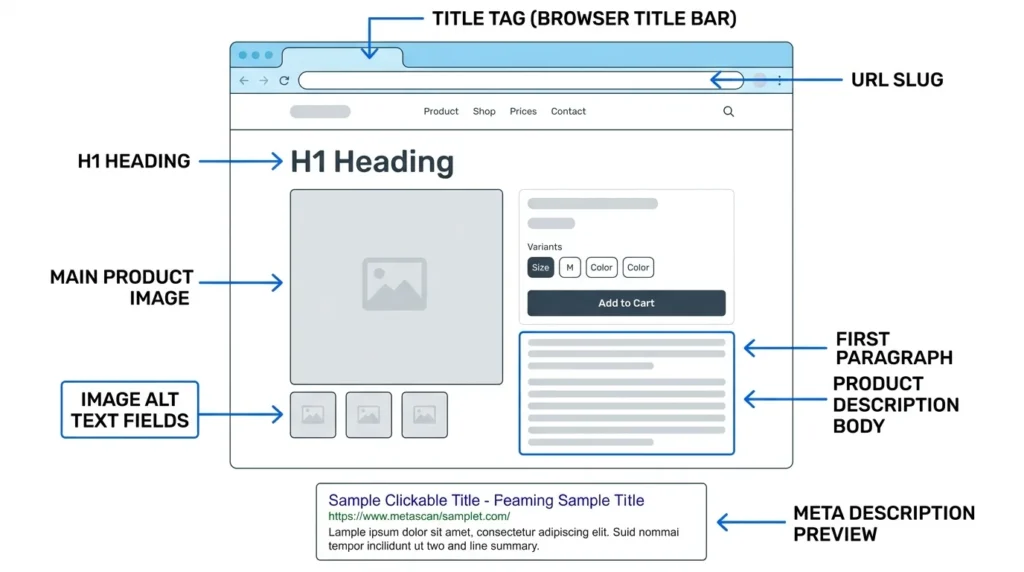
After placing your keywords, you should always check your on-page SEO to ensure your titles, headings, and content are properly optimized.
Doing keyword research for Shopify is only half the battle. The other half is placing those keywords in exactly the right spots on each page. Here is where every primary keyword should appear:
Title Tag (SEO Title)
Your primary keyword should appear in the first 60 characters of your page title. For a product page selling a lavender soy candle, your title might be: ‘Lavender Soy Candle 8oz — Natural & Hand-Poured | [Brand Name].’ Google displays roughly 60 characters in search results, so keep it concise and keyword-rich.
URL Slug
Your URL should be clean, short, and contain your primary keyword. Shopify auto-generates slugs from your page title, but you should manually edit them to remove stop words. For example: /products/lavender-soy-candle-8oz rather than /products/lavender-soy-candle-8oz-natural-hand-poured.
H1 Heading
Every page should have exactly one H1 heading, and it must include your primary keyword. On product pages, this is typically the product name. On blog posts, it is the article title. The H1 is the strongest on-page ranking signal after the title tag.
First 100 Words
Your primary keyword should appear naturally within the first 100 words of your page content. This signals to Google what the page is about right from the start. Do not force it — write naturally and work the keyword in where it fits.
Meta Description
While meta descriptions are not a direct ranking factor, they dramatically affect your click-through rate from search results. Include your primary keyword and a compelling reason for the user to click. Keep it between 150 and 160 characters.
H2 and H3 Subheadings
Use H2 headings to organize your content into sections, and include related keywords and variations naturally within them. H3 headings further subdivide content. This heading structure helps both Google and readers navigate your page efficiently.
Image Alt Text
Every image on your Shopify store should have descriptive alt text that includes a relevant keyword where natural. Alt text helps Google understand what your images depict and is also critical for accessibility. For example: ‘lavender soy candle in 8oz glass jar — hand-poured and natural.’
You should also optimize your images by compressing and converting them to WebP format to improve page speed and SEO performance.
Body Content — Maintaining 1% Keyword Density
Aim for your primary keyword research for Shopify focus term to appear approximately once every 100 words — a density of about 1%. This is enough for Google to recognize the topic without triggering keyword-stuffing penalties. Use synonyms, related phrases, and natural variations throughout to strengthen topical relevance.
On-Page Element | Keyword Placement Rule | Priority |
Title Tag | Primary keyword in first 60 characters | Critical |
URL Slug | Primary keyword, short, no stop words | Critical |
H1 Heading | Primary keyword once, naturally phrased | Critical |
Meta Description | Primary keyword + compelling CTA, 150–160 chars | High |
First 100 Words | Primary keyword appears once naturally | High |
H2 Subheadings | Related keywords and LSI variations | Medium |
Image Alt Text | Descriptive keyword phrase for each image | Medium |
Body Content | ~1% density — once per 100 words | Medium |
Internal Links | Anchor text includes keyword variations | Medium |
8. Common Keyword Research Mistakes Shopify Owners Make
Even well-intentioned store owners make these mistakes when doing keyword research for Shopify. Avoid them from day one.
Targeting Only High-Volume Keywords
This is the most common mistake. New store owners see a keyword with 50,000 monthly searches and immediately add it to their strategy, only to find their pages buried on page ten of Google. High volume almost always means high competition. Build your authority first with low-competition long-tail keywords.
Ignoring Search Intent
Publishing a blog post targeting a keyword that Google interprets as transactional, or creating a product page for an informational keyword, will almost never rank. Always check the current search results for a keyword before you create a page for it. The type of content that already ranks tells you exactly what Google thinks users want.
Keyword Cannibalization
When multiple pages on your Shopify store target the same keyword, they compete against each other and dilute your ranking potential. Keep a keyword map spreadsheet and assign each keyword to exactly one page.
Setting and Forgetting
Search behavior changes constantly. New competitors enter your niche, trends shift, and Google’s algorithm evolves. Effective keyword research for Shopify is not a one-time event — it is an ongoing quarterly practice.
Skipping Product Page Optimization
Many Shopify owners invest in blog content but neglect their product and collection pages. Yet these are the highest-converting pages on your site. Every product page deserves its own carefully researched long-tail keyword and fully optimized title, description, and alt text.
Frequently Asked Questions About Keyword Research for Shopify
How long does it take to rank on Google using keyword research for Shopify?
Long-tail keywords are the crown jewels of ecommerce, and using a long-tail keyword analyzer tool can help you identify low-competition opportunities with high conversion potential.
For low-competition long-tail keywords (KD 0 to 25), you can expect to see page-one rankings within 3 to 6 months of publishing well-optimized content, assuming your site has no major technical SEO issues. Medium-competition keywords typically take 6 to 12 months.
How many keywords should I target per Shopify product page?
Target one primary keyword and two to four closely related secondary keywords per page. Do not try to stuff multiple unrelated keywords into a single page — Google prefers depth on one topic over shallow coverage of many.
Is keyword research for Shopify different from regular SEO keyword research?
The core process is the same, but Shopify SEO places extra emphasis on product-specific and transactional keywords, collection page optimization, and ecommerce search intent. You also need to be mindful of Shopify-specific technical SEO issues such as duplicate content from faceted navigation and canonical tags.
Can I do keyword research for Shopify completely for free?
Yes. Google Keyword Planner, Google Search Console, Google Autocomplete, the ‘People Also Ask’ section, and Ubersuggest’s free tier together give you everything you need to build a solid initial keyword research for Shopify strategy at zero cost.
What is the ideal keyword density for Shopify store content?
Aim for approximately 1% keyword density — that means your primary keyword appears roughly once every 100 words. Avoid exceeding 2% as this risks being flagged as keyword stuffing by Google’s algorithms.
Conclusion
Mastering keyword research for Shopify is the single highest-return investment you can make in your store’s long-term growth. It takes some time and practice to get right, but the payoff — consistent, free, high-converting organic traffic from Google — is more than worth the effort.
To recap the key steps covered in this guide:
- Understand the three types of keywords: head, body, and long-tail.
- Evaluate keywords by search volume, keyword difficulty, and search intent.
- Use free tools like Google Keyword Planner and Search Console to start.
- Follow the six-step keyword research for Shopifyprocess: brainstorm, expand, explore Google’s suggestions, analyse competitors, filter, and cluster.
- Map every keyword to the right page type in your Shopify store.
- Place keywords in your title tag, URL slug, H1, meta description, body content, and image alt text.
- Avoid common mistakes like targeting high-difficulty keywords too early and ignoring search intent.
- Track, review, and refine your strategy every quarter.
Whether you are launching your very first Shopify store or scaling an established brand, the principles of keyword research for Shopify remain the same: find what your customers are searching for, create the best possible content to answer that search, and optimize every element of your page to communicate relevance to Google.
Ready to grow? Start your keyword research for Shopify today using Google Keyword Planner — it is free, powered by real Google data, and all you need to build your first keyword strategy.
Most Popular Tools - No Signup Needed
👉 We provide a complete suite of free SEO, content, and optimization tools designed to help you rank higher on search engines and improve your website performance — without any cost or signup.