









What You’ll Learn
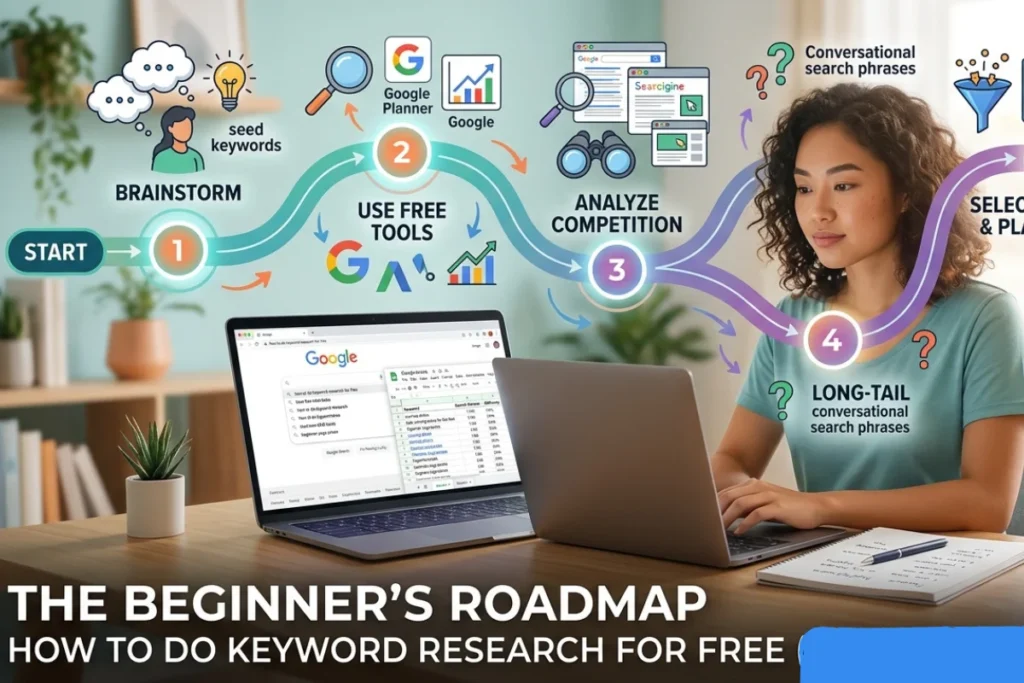
Before we dive into the How To Do Keyword Research For Free step-by-step methods, here is a breakdown of the value this guide provides:
-
The 2026 SEO Framework: Understand why traditional keyword research has shifted toward intent-based discovery.
-
Zero-Budget Tools: How to use Google’s native ecosystem (Search, Trends, and Console) to get premium-level data.
-
The Alphabet Method: A simple hack to uncover hundreds of long-tail keywords in minutes.
-
Search Intent Mastery: How to distinguish between users who want to learn and users who want to buy.
-
Competitor Reverse-Engineering: How to “steal” content structures from the top-ranking pages on the SERP.
-
Performance Optimization: Using your own site data to find “low-hanging fruit” keywords that are easy to rank for.
Why Keyword Research Still Matters in 2026
The digital landscape has evolved significantly, but one fundamental truth remains: if you want your content to be found, you must speak the same language as your audience. Keyword research is the process of discovering the specific terms, questions, and phrases people type into search engines. In 2026, SEO is no longer just about “tricking” an algorithm; it is about providing the most relevant answer to a user’s query.
Many people mistakenly believe that high-quality data requires a high-quality price tag. However, once you understand how to do keyword research for free, you realize that Google provides all the tools necessary to compete with the biggest brands in your niche. This guide breaks down those barrier-to-entry costs so you can focus on growth instead of expenses.
Many beginners believe they need expensive monthly subscriptions to premium SEO suites to succeed. However, the most accurate data actually comes directly from the source. Knowing how to do keyword research for free using Google’s own ecosystem allows you to see exactly what the search engine prioritizes. Free methods still work because they leverage real-time user behavior rather than historical database estimates.
In this guide, you will learn a step-by-step framework to uncover high-value search terms, analyze competitor gaps, and understand the “why” behind every search. By the end of this post, you’ll have a complete keyword strategy without spending a single penny.
Understanding Search Intent Before You Start
Before you open a single tool, you must understand Search Intent. In 2026, Google’s AI-driven algorithms prioritize intent over exact-match keywords. If you target a high-volume keyword but provide the wrong type of content, you will never rank on the first page.
The Four Pillars of Search Intent
If you want to master how to do keyword research for free, you must treat search intent as your north star. Without a clear understanding of what the user wants, even the most popular keywords will fail to convert. Intent analysis ensures that your free research translates into real-world traffic and engagement.
To master how to do keyword research for free, you must categorize your findings into these four groups:
Informational: The user is looking for an answer or a guide (e.g., “how to bake a cake”).
Navigational: The user wants to find a specific website or tool (e.g., “YouTube” or “WebP Converter”).
Transactional: The user is ready to buy (e.g., “buy running shoes”).
Commercial Investigation: The user is comparing products (e.g., “best laptops for students”)
Why Intent Trumps Volume
Targeting a keyword with 50,000 searches sounds great, but if that keyword is “free movies” and you are trying to sell a premium streaming service, your bounce rate will skyrocket. High-quality SEO focuses on relevance.
Examples of Keyword Targeting
Good Targeting | Bad Targeting |
“Best 2026 SEO tips” for a marketing blog | “SEO” for a beginner’s guide |
“How to compress images” for a WebP Converter | “Internet” for a tech tutorial |
When you analyze search intent, you ensure that every visitor who clicks your link finds exactly what they were looking for. This builds trust with both the user and Google.
Using Google Search Autocomplete for Keyword Ideas
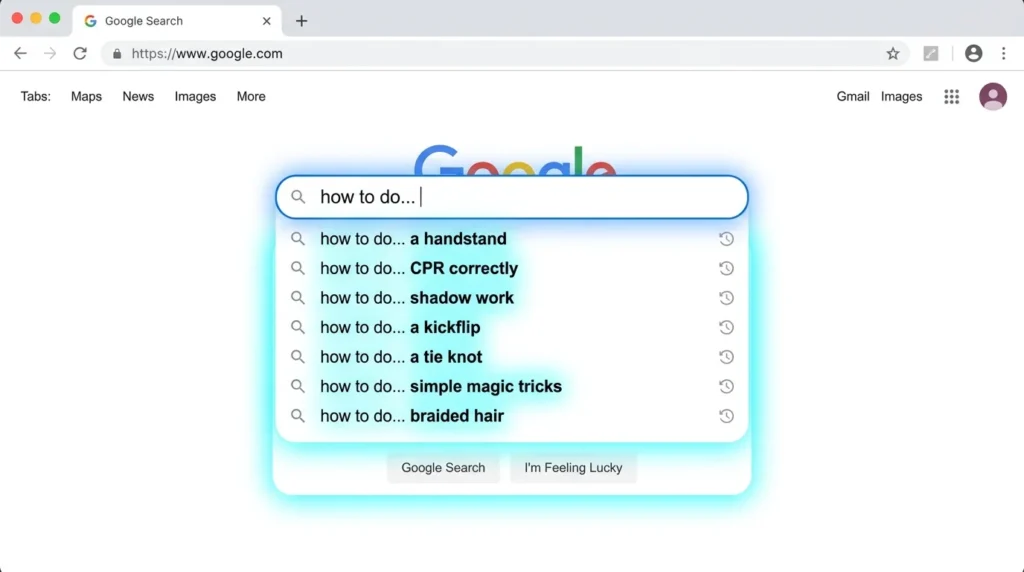
One of the fastest ways to see what the world is searching for right now is through Google Autocomplete. This isn’t just a convenience feature for users; it is a direct window into Google’s real-time search data. When you begin typing a query, Google predicts the rest based on common searches.
The “Alphabet Method” (A–Z Expansion)
To truly master how to do keyword research for free, you should use the alphabet method. This involves typing your seed keyword followed by each letter of the alphabet to reveal hidden long-tail variations.
- Step 1: Type your main topic (e.g., “Keyword research”).
- Step 2: Type “Keyword research a…”, then “Keyword research b…”, and so on.
- Step 3: Document the suggestions that appear. These are high-volume phrases that people are actively seeking.
This simple A–Z technique is a cornerstone of how to do keyword research for free. It allows you to dig deeper than your competitors who only look at the surface-level results. By systematically going through the alphabet, you uncover specific user needs that paid tools often overlook in their bulk exports.
Finding Long-Tail Keywords Easily
Long-tail keywords are longer, more specific phrases that are generally easier to rank for. For example, instead of just targeting “SEO,” Autocomplete might suggest “SEO tips for small business owners in 2026.” These specific phrases often have a higher conversion rate because the user’s needs are clearly defined.
Leveraging “People Also Ask” (PAA) for Content Opportunities
The People Also Ask (PAA) box is a goldmine for content creators. It provides a list of questions that are semantically related to your primary search query. Since Google is literally telling you what other questions users have, answering these is a guaranteed way to increase your topical authority.
How to Find and Expand PAA Questions
When you search for “how to do keyword research for free,” look for the box featuring several questions. Every time you click a question to read the answer, Google will dynamically load more related questions at the bottom of the list.
Turning Questions into Blog Sections
Don’t just look at these questions—use them as your H3 or H4 subheadings. For instance, if a PAA question is “Is Google Keyword Planner free?”, you should include a section in your post answering exactly that. This helps you rank for “featured snippets,” which are the boxes that appear at the very top of search results.
The SEO Benefit of Answering Queries
By addressing PAA questions, you are optimizing for Semantic Search. This tells Google that your content is comprehensive and provides a “one-stop-shop” for the user’s problem. If your post becomes too long while drafting these sections, you can use a Word Counter to ensure your keyword density remains balanced and your length is optimal for your target audience.
Extracting Keywords from Google Related Searches
At the very bottom of the Google Search Results Page (SERP), you will find the Related Searches section. While Autocomplete shows you what people are typing as they search, Related Searches show you what they searched for after their initial query failed to give them a perfect answer.
Identifying Semantic Keywords (LSI-style terms)
In 2026, Latent Semantic Indexing (LSI) concepts—or semantically related terms—are vital. These are words that naturally co-occur with your main topic. If you are writing about keyword research, Google expects to see terms like “search volume,” “ranking,” and “competitor analysis.”
Primary Keyword | Related Search Suggestions |
Keyword Research Free | “Free keyword tool for YouTube” |
SEO Tools 2026 | “Best free SEO browser extensions” |
Search Intent | “How to determine intent manually” |
When you combine these related terms with your primary findings, you create a complete topical map. This is a vital part of how to do keyword research for free because it helps you identify “semantic clusters.” These clusters tell Google that your content isn’t just about one word, but about the entire subject.
How to Use These for Topic Clusters
Related searches help you build “Topic Clusters.” Instead of writing one giant post, you can find related searches and create smaller, supporting posts that link back to your main guide. This internal linking structure is a powerful signal to search engines that your site is an authority on the subject.
Using Google Trends to Find Trending & Seasonal Keywords
Data from the past is helpful, but in 2026, real-time relevance is king. Google Trends is the ultimate tool for determining if a keyword is growing in popularity or dying out. When learning how to do keyword research for free, you must avoid “zombie keywords”—terms that have high historical volume but zero current interest.
How to Compare Keywords
If you are torn between two topics, such as “AI SEO Tips” vs. “Manual Keyword Research,” plug both into Google Trends. You can filter by:
- Timeframe: Set it to the last 90 days to see 2026’s specific trajectory.
- Geography: See where your audience is most active.
Finding Rising Topics
Scroll down to the “Related Queries” section in Google Trends and look for the “Breakout” label. These are topics experiencing a sudden surge in traffic. Capitalizing on a breakout trend before your competitors do is the fastest way to hit the first page.
Analyzing Competitors Using Google Search Results
You don’t need a paid “Competitor Gap Analysis” tool when you have the Google SERPs (Search Engine Results Pages). Your competitors have already done the hard work; you just need to reverse-engineer their success.
How to Manually Analyze Top Pages
Search for your focus keyword and open the top three results. Look for the following:
- Headings (H2s & H3s): What sub-topics are they covering?
- Content Length: Are they writing 1,000 words or 3,000? Use a Word Counter to get an exact average of the top-ranking pages.
- Media: Are they using videos, custom charts, or QR Code Generators to offer downloadable checklists?
Identifying “Content Gaps”
Look for what the competitors missed. If all the top results are technical and dry, you can win by providing a more conversational, step-by-step guide. Check the “Comments” section on competitor blogs or YouTube videos to see what questions users are still asking—those questions are your new keywords.
Manual competitor analysis is the most underrated aspect of how to do keyword research for free. By looking at what is already ranking, you get a “live” look at Google’s preferences. This allows you to tailor your content to fill the gaps that your competitors have left wide open, giving you a significant ranking advantage.
Using Google Search Console for Hidden Keyword Opportunities
If you already have a website, Google Search Console (GSC) is your most powerful asset. It shows you the exact queries that are bringing people to your site—including “hidden” keywords you didn’t even know you were ranking for.
Finding “Low-Hanging Fruit”
Navigate to the “Performance” report and look for keywords with high Impressions but low Clicks. This usually means you are ranking on page two or three (positions 11–25).
- The Strategy: Update the content for those specific keywords, add more detail, and improve your meta description.
- The Result: A small update can often push these “low-hanging fruit” keywords onto page one, resulting in a massive traffic spike.
A common mistake when learning how to do keyword research for free is ignoring the strength of the competition. If you see only massive authority sites on page one, it is often better to pivot to a more specific long-tail variation. This strategic flexibility is what separates successful SEOs from those who struggle for visibility.
Improving Existing Content
GSC also reveals which pages are losing steam. If a high-performing post from last year is dropping in rank, use GSC to see which specific keywords are declining. Refresh that section with 2026 data to reclaim your spot. When updating technical guides, ensure your site security is visible; tools like a Password Strength Tester can be useful additions to security-related content to keep users engaged longer.
Organizing and Selecting the Best Keywords
By now, you have a massive list of potential terms. However, trying to rank for everything at once is a recipe for failure. Learning how to do keyword research for free culminates in the ability to filter and prioritize.
How to Choose the Right Keyword
Focus on the “Sweet Spot”: the intersection of High Relevance, Reasonable Volume, and Low Competition. Use Google’s Search Results to gauge competition; if the first page is filled with massive sites like Wikipedia or Forbes, you may want to choose a more specific long-tail keyword.
Creating a Simple Keyword Plan
Organize your keywords into a table to visualize your content map:
Target Keyword | Search Intent | Content Type |
How to do keyword research for free | Informational | Pillar Blog Post |
Best free SEO tools 2026 | Commercial | Comparison List |
Google Keyword Planner login | Navigational | Quick Guide |
For technical accuracy, ensure your final content is easy to read. If you are sharing code snippets or data structures, an HTML Viewer can help you preview how your formatting looks before you hit publish.
Common Keyword Research Mistakes to Avoid
Even with the best tools, a poor strategy will yield poor results. Avoid these three common traps:
- Targeting High Competition Keywords: Don’t try to rank for “SEO” on a new blog. Start with specific, niche queries and build your authority upward.
- Ignoring Intent: Never force a transactional keyword into an informational post. Google’s AI will notice the mismatch and lower your ranking.
- Not Validating with Real Search Data: Trends change fast. Always verify your keywords in Google Trends before committing to a 2,000-word article.
For more information on high-level SEO standards, you can refer to the official Google Search Essentials or the Moz Beginner’s Guide to SEO.
Frequently Asked Questions (FAQ)
Is it really possible to do keyword research for free?
Yes. While paid tools provide convenience and bulk data, the actual source of truth for search behavior is Google itself. By combining Google Autocomplete, “People Also Ask,” and Google Trends, you can build a professional-grade SEO strategy without a monthly subscription.
How do I know if a keyword is too difficult to rank for?
A quick way to check difficulty for free is to look at the first page of results. If the top 10 results are all major brands or high-authority sites, the keyword is “difficult.” If you see forum posts (like Reddit or Quora) or smaller niche blogs, that is a sign the keyword is “easy” to target.
What is the difference between a seed keyword and a long-tail keyword?
A seed keyword is a short, broad term like “SEO.” A long-tail keyword is more specific, such as “how to do keyword research for free for a new blog.” Long-tail keywords have lower search volume but much higher conversion rates.
How often should I perform keyword research?
Keyword research is not a one-time task. You should perform a quick check every time you write a new post and a deep dive into your Google Search Console every quarter to see if new trends are emerging in your niche.
Do I need to use the exact keyword multiple times for SEO?
In 2026, Google is smart enough to understand synonyms. While you should include your focus keyword in your title and a few times in the body (aiming for about 1% keyword density), focus more on providing a comprehensive answer than on hitting a specific number.
Can I use these methods for YouTube or Social Media?
Absolutely. Google Autocomplete and Google Trends both have filters specifically for YouTube search, making these methods highly effective for video creators as well as bloggers.
Does the device I use change my results?
Yes, occasionally. When testing how to do keyword research for free, it is helpful to check results on both mobile and desktop. Google sometimes suggests different autocomplete queries based on the device, providing you with even more data points for your content strategy.
Mastering SEO Without the Price Tag
In 2026, the secret to ranking on the first page of Google isn’t having the biggest marketing budget—it’s having the best understanding of your audience. Learning how to do keyword research for free allows you to strip away the noise of third-party estimates and get your data directly from the source.
By leveraging Google Trends, mastering Search Intent, and mining the People Also Ask boxes, you can build a robust content strategy that stands the test of time. Remember, SEO is a marathon, not a sprint. The goal is to consistently provide value by answering the questions your users are actually asking. As you finalize your post, you might want to use a Word Counter to ensure your content is the right length for your niche, or a WebP Converter to keep your page speeds lightning-fast.
Ready to Dominate the Search Results?
Now that you have the blueprint for free keyword research, it’s time to take action! Don’t let your research sit in a spreadsheet—start creating content that answers your users’ most pressing needs today.
Here is your 3-step challenge:
Find 5 Long-Tail Keywords using the Alphabet Method in Google Autocomplete.
Verify Their Trend in Google Trends to ensure they are gaining popularity in 2026.
Write Your First Post targeting the lowest competition keyword from your list.
Join the Conversation: Which Google tool is your favorite for finding hidden keyword gems? Have you found a “breakout” topic recently? Drop a comment below and let’s discuss your SEO wins! If you found this guide helpful, share it with a fellow creator who is tired of paying for expensive SEO tools.
More Posts
Mastering SEO | 12 Expert Tips on How to Do Keyword Research for Free
What You’ll Learn Before we dive into the How To...
Read MoreQR Code Lead Generation | The Complete 2026 Business Guide (Step-by-Step System That Converts Visitors Into Customers)
Why QR Code Lead Generation Is Exploding in 2026 QR...
Read MoreI Built a Tool-Based Website in 30 Days | My 2026 Traffic and Revenue Report (Case Study)
Why I Chose Tool-Based Website Over Blogging Building a tool-based...
Read MoreHow to Quickly Improve Readability Score in 5 Minutes (Step-by-Step Guide for Total Beginners)
Think about the last time you landed on a page...
Read MoreHow to Start a Profitable Niche Blog in 2026: The Ultimate $10k/Month Blueprint
If you have ever wondered how to start a profitable...
Read MoreTop 10 Free Keyword Research Tools for Beginners in 2026
Are you a beginner struggling to find good keywords without...
Read MoreMake Money Online with AI Tools for Beginners in 2026: Complete Guide
Why 2026 Is the Best Year to Start The internet...
Read More10 Micro SaaS Ideas with Revenue Examples That Make $1K–$10K MRR
Discover 10 proven micro SaaS ideas with revenue examples making...
Read More10 Best Free SEO Tools for Small Businesses in 2026 (Boost Rankings Fast)
Small business owners in 2026 face a tough challenge: ranking...
Read MoreFree Image to WebP Converter Online: Convert JPG, PNG, GIF to WebP Instantly for Faster Websites in 2026
In today’s digital landscape, image optimization is no longer optional...
Read More