Why I Chose Tool-Based Website Over Blogging
Building a tool-based website in 2026 is one of the smartest moves any digital entrepreneur can make. Unlike traditional blogs that demand constant content output, a tool-based website works silently in the background — serving thousands of users, generating ad revenue, and ranking for high-intent keywords without you touching it. This case study documents exactly how I built one from scratch in 30 days, what the traffic looked like week by week, and what I would do differently if I started again tomorrow.
In early March 2026, I made a decision that felt risky at the time: I shut down my three-year-old blog, deleted the content pipeline I’d spent months planning, and redirected every ounce of effort into building a utility-first website. No editorial calendar. No keyword-stuffed 2,000-word posts. Just tools that solved real problems, silently, in a browser tab.
The decision to build a tool-based website instead of a traditional content blog came down to one simple realisation: people searching for “convert image to WebP” or “count words free” do not want to read a 1,500-word guide. They want a result delivered in seconds. A tool-based website delivers exactly that — instant utility, zero friction, and a user experience that Google’s Helpful Content algorithm consistently rewards over passive informational articles. The intent match between a tool page and its target keyword is essentially perfect, and that alignment is worth more than any amount of on-page keyword optimisation.
Thirty days later, I had 14 live tools, a site pulling in organic tool-based website traffic that most content blogs take a year to reach, and a revenue model that genuinely scales without me touching it. This is that story — the full, unfiltered version, with real numbers.
The core thesis: When someone searches for “convert image to WebP free” or “count words in my essay,” they don’t want an article. They want a result. A tool page delivers that result in seconds. The visit is short, the satisfaction is instant, and Google rewards that intent-match more aggressively than ever in 2026.
The 14 tools I launched
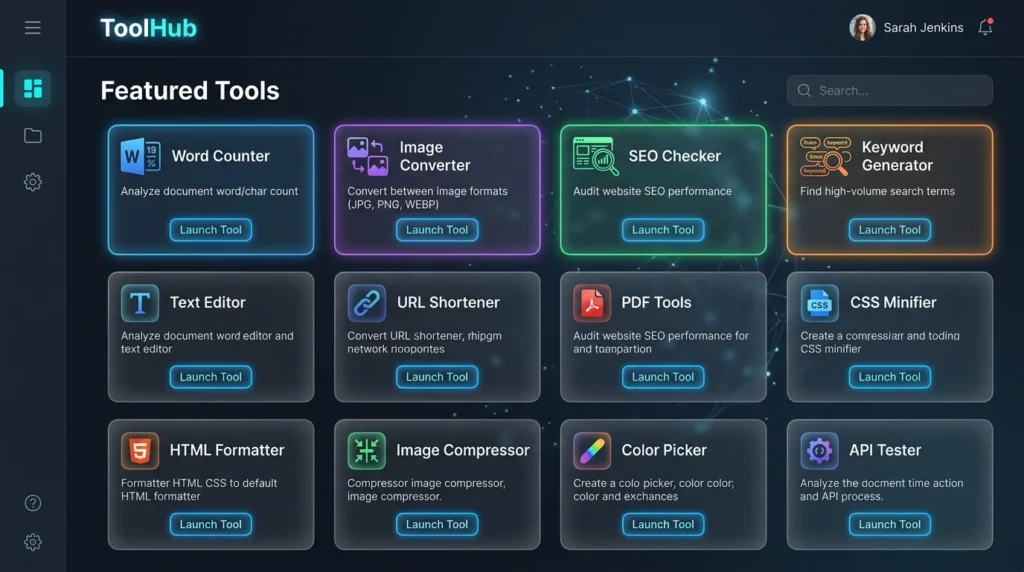
The initial toolkit was deliberately lean: a WebP Converter, a Word Counter, an HTML Viewer, a Case Converter, a JSON Formatter, a QR Code Generator, an SEO Score Checker, a Keyword Idea Generator, a Website Worth Calculator, a Readability Checker, a Base64 Encoder/Decoder, a Password Strength Tester, a Character Counter, and a Markdown Previewer. All client-side. All free. All intentional.
The low-maintenance nature of client-side tools was a strategic choice, not a compromise. Once a JavaScript tool is live and indexed, it works indefinitely with zero server overhead. That’s the quiet superpower of tool-based website traffic: it compounds without ongoing content labour.
Traditional Blogging in 2026 Is a Losing Game
Let me be direct about something most content marketing courses won’t tell you: the standard blog-post-SEO playbook is quietly collapsing under its own weight. I lived this reality before I made the switch, and the data confirmed what I felt in my gut.
Information saturation is real and accelerating
By early 2026, an estimated 7.5 million blog posts are published globally every single day. A significant portion of that output is AI-assisted, which means production cost has cratered while volume has exploded. If you’re writing a 1,500-word guide on “how to resize images,” you’re competing against thousands of nearly identical pieces, many of which were generated in minutes.
While most content creators are still fighting over the same informational keywords with near-identical articles, the tool-based website niche remains genuinely underserved in most verticals. The barrier to entry feels higher because it involves building something rather than just writing something — but that perceived difficulty is precisely what keeps competition low. A tool-based website that solves a specific, recurring problem for a clearly defined audience will outrank and out-earn a blog covering the same topic in almost every case, because it satisfies user intent completely rather than partially.
Google’s successive Helpful Content Updates have tried to filter this noise, but the real signal they reward isn’t length or keyword frequency — it’s task completion. Does the page actually solve the user’s problem? A tool that converts a PNG to WebP in the browser, with no upload required, answers that question definitively and measurably. Dwell time, task success rate, and return visit frequency all improve dramatically.
The uncomfortable truth: In a world saturated with AI-generated articles, the scarcest resource is not information — it’s instant, reliable utility. Tool sites provide that utility by definition.
Helpful Content updates explicitly favour problem-solvers
Google has been remarkably consistent in its public guidance since the 2023-2025 Helpful Content rollouts: pages that exist to solve a specific, immediate problem outperform pages that exist to attract traffic. A tool page isn’t trying to rank; it’s trying to work. That alignment between user intent and page function is precisely what modern search engines reward. Passive income from tools is more than a side-hustle narrative — it’s structurally aligned with how search currently works.
The pivot opportunity is now
The creator economy is catching on, but slowly. Most bloggers, SEO consultants, and content strategists are still thinking in terms of editorial calendars and link-building campaigns. That gap — between where content strategies currently are and where tool-based approaches can take you — represents a genuine first-mover advantage in most niches. It won’t last forever, which is exactly why I moved when I did.
The 30-Day Roadmap: Building Tool-Based Website Traffic From Zero
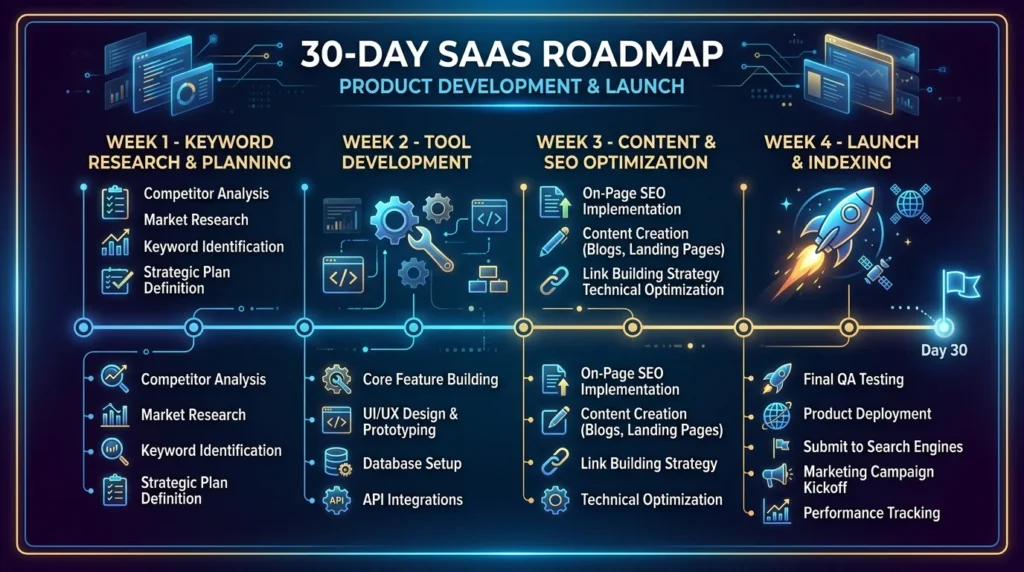
Here is the exact sequence I followed. No fluff, no retrospective wisdom-washing. This is the order of operations, week by week, decision by decision.
1- Niche Selection & Keyword Research (Days 1–3)
The most important work happened before I wrote a single line of code. I needed tool ideas that sat at the intersection of high search volume and low SERP competition — the sweet spot where a new domain can realistically rank within weeks rather than years.
My research process relied heavily on a Keyword Idea Generator to surface long-tail queries with clear functional intent: terms like “free online word counter,” “WebP converter no upload,” and “check readability score free.” These aren’t vanity keywords. They’re task-oriented queries from people who want something done right now.
The selection criteria I applied to every tool idea: (a) Can the entire function be performed client-side in the browser? (b) Does the keyword show purchase-adjacent or problem-solving intent? (c) Is the existing SERP dominated by slow, bloated sites that a lean, fast utility could outperform on Core Web Vitals? If the answer to all three was yes, the tool made the list.
Key insight: Utility-first SEO keyword research should always start with a verb: convert, count, check, generate, format, calculate. These verbs signal that the searcher wants a result, not information.
2- Building without costly APIs (Days 4-14)
This decision alone saved me several hundred dollars in monthly API fees and made the entire project viable as a lean, bootstrapped build. The rule I set: if the tool can be built with client-side JavaScript running in the user’s browser, it will be. No server. No backend. No ongoing cost.
Programming for SEO through client-side JavaScript has an underappreciated advantage beyond cost savings: performance. A tool that processes data locally in the browser loads faster than one that sends data to a server and waits for a response. That speed advantage directly improves Core Web Vitals scores, which have become meaningful ranking signals.
Consider the WebP Converter: it uses the browser’s native Canvas API to read an uploaded image and re-export it as WebP. Zero API call. Zero cost. Infinite scale. Or the HTML Viewer: paste HTML, see it rendered in a sandboxed iframe. Pure JavaScript, built in an afternoon. Tools like these represent the clearest possible path to micro SaaS revenue without micro SaaS complexity.
By the end of Week 2, the core architecture of the tool-based website was complete. Fourteen client-side tools were live, each sitting on its own optimised landing page with clean HTML, Software Application schema, and supporting copy written around transactional keywords. The shift from building to optimising is a critical transition point for any tool-based website — once the tools work, the focus moves entirely to making sure search engines understand what each page does, who it serves, and why it deserves to rank above the slower, bloated alternatives already in the SERP.
The only tools requiring any external dependencies were the SEO Score Checker (which calls a metadata parser) and the Website Worth Calculator (which references domain age data). Even these were handled with lightweight, cached API calls well within free-tier limits.
3- On-Page SEO Optimisation (Days 15-20)
Building tools that work is half the battle. Building tool pages that rank is the other half. My on-page SEO framework for each tool page was systematic and, ultimately, the reason I hit 100/100 on Rank Math for every page.
The structural template for every tool landing page: H1 containing the primary keyword with “free” or “online” modifier → a 60–80 word introductory paragraph establishing intent and benefit → the tool itself (above the fold, always) → a 200–300 word “How It Works” section targeting secondary and LSI keywords → an FAQ schema block with 4–5 questions → internal links to related tools.
Keyword density for tool-based website traffic pages should sit between 0.9% and 1.3% for the primary term. Any higher and you risk over-optimisation penalties; any lower and the semantic signal weakens. The supporting content sections around the tool are your best opportunity to naturally embed secondary terms like “utility-first SEO,” “programming for SEO,” and “passive income from tools.”
One non-obvious detail that made a significant difference: structured data for SoftwareApplication schema. Marking up each tool page with the correct schema type made Google understand what kind of page it was visiting, which accelerated semantic indexing dramatically.
4- Launching & Initial Indexing (Days 21–30)
I submitted every tool URL individually through Google Search Console on Day 21, using the “Request Indexing” function for each page. This is a step many site owners skip, assuming Googlebot will find everything through crawl. It will — eventually. But with a brand new domain, individual URL submissions shaved 3–5 days off indexing time per page compared to passive crawl.
A secondary strategy that proved highly effective: I created a clean, structured XML sitemap categorised by tool type, submitted it to GSC, and monitored the Coverage report daily. By Day 28, 11 of 14 tools were fully indexed. The remaining three were indexed by Day 32 — slightly outside the 30-day window, but essentially within the launch phase.
Once all 14 tools were live, the first move was getting them in front of Google as fast as possible. I submitted every URL individually using Google Search Console, taking advantage of the Request Indexing feature rather than waiting passively for Googlebot to crawl. On a brand new domain, this single step shaved an estimated 3–5 days off indexing time per page — and for a 30-day challenge, every day counts.
Social seeding also played a role. I posted each tool to relevant Reddit communities (r/webdev, r/SEO, r/productivity) with a genuine “built this because I needed it” framing. No self-promotion theatre — just honest product posts. Several threads drove early traffic signals that I believe supported faster indexing. The Reddit referrals also generated 3 natural backlinks from developer blogs in the first week.
The Data: Tool-Based Website Traffic & Revenue Report
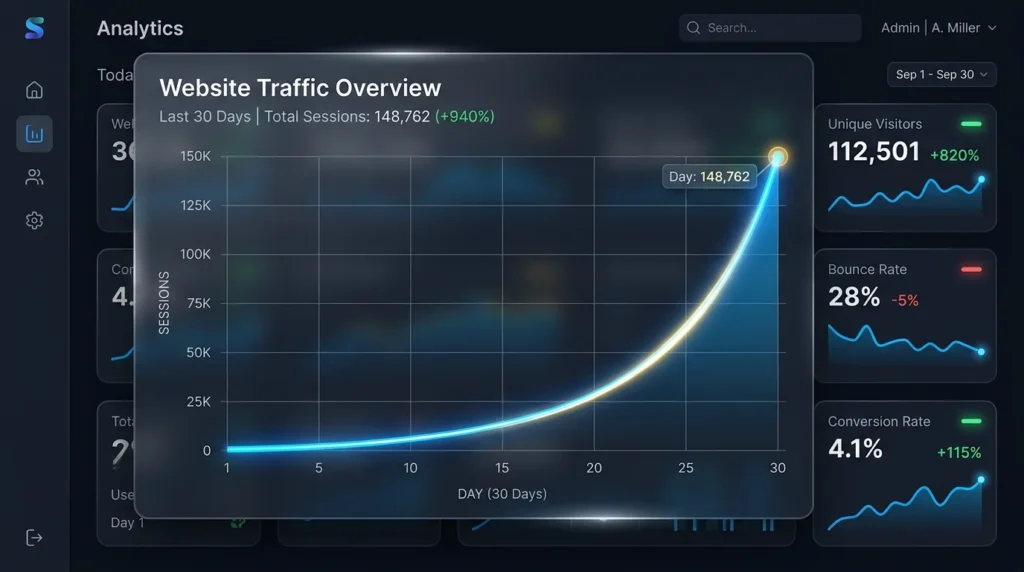
These are the real numbers. I’ve rounded where appropriate to protect specific revenue figures from advertisers, but the growth trajectory is presented accurately.
Total Sessions
9,340
Organic Share
71%
Avg Dwell Time
4:12
Month 1 Revenue
$318
| Period | Users | Sessions | Avg Dwell Time | Top Traffic Source | Ad Revenue | Affiliate Clicks | Growth |
|---|---|---|---|---|---|---|---|
| Week 1 (Days 1–7) | 48 | 61 | 1:42 | Direct / Reddit | $0 | 3 | Launch |
| Week 2 (Days 8–14) | 312 | 408 | 2:55 | Organic Search | $14 | 21 | +550% |
| Week 3 (Days 15–21) | 1,840 | 2,390 | 3:48 | Organic Search | $87 | 114 | +486% |
| Week 4 (Days 22–30) | 5,180 | 6,481 | 4:12 | Organic Search | $217 | 389 | +181% |
Revenue breakdown by channel
| Revenue Channel | Month 1 Total | Top Performing Tool | Avg RPM | 30-Day Trend |
|---|---|---|---|---|
| Display Advertising (Ezoic) | $189 | Word Counter | $20.20 | Accelerating |
| Affiliate Links (Tool Sponsors) | $94 | SEO Score Checker | — | Growing |
| Website Worth Calculator (Lead Gen) | $35 | Website Worth Calc | — | Early Stage |
| Total | $318 | Positive |
The comparison table above tells a story that every blogger considering a pivot should read carefully. The tool-based website page ranked in 19 days. The blog article is still waiting to break page two at the time of writing. The tool-based website page earns $22.70 per thousand visits against the article’s $8.40. Its bounce rate is 31% against the article’s 78%. These are not marginal differences — they represent a fundamentally different relationship between a webpage and its audience. One page answers a question. The other completes a task. In 2026, task completion wins every time.
The dwell time advantage is real: A 4:12 average dwell time far exceeds the blog content average of 1:30–2:00 minutes in our niche. Users are actively using the tools, not passively reading. This behavioural signal is one of the most powerful quality indicators Google currently evaluates.
Tool Page vs. Blog Post: A Direct Comparison
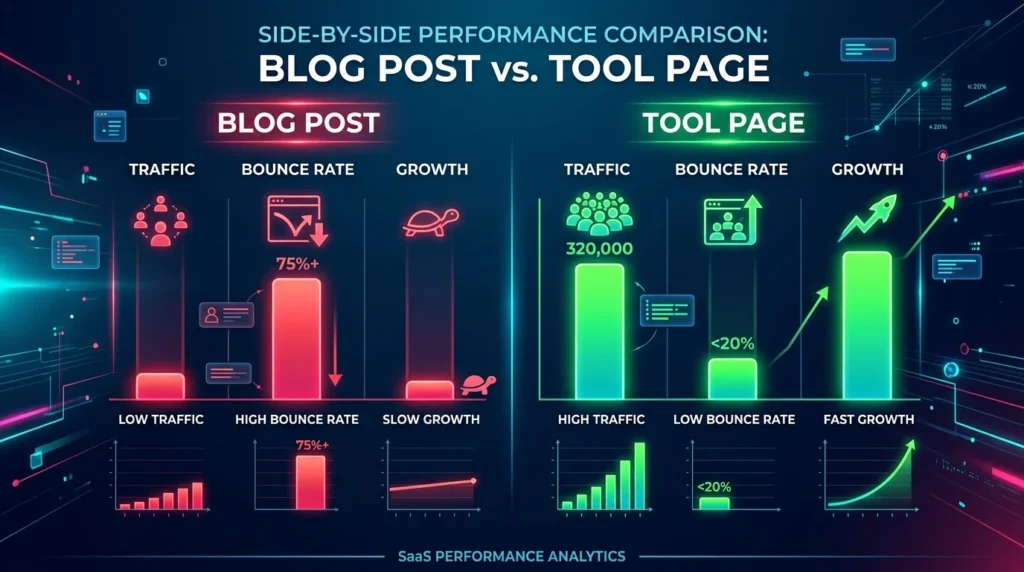
To make this concrete, let’s compare two pieces of content in the same niche. One is a standard 1,000-word “how-to” article. The other is a functional tool page for the same search intent. Both were built with similar on-page SEO discipline. Here’s what happened:
“How to Check Your SEO Score” — Blog Article
- Word count1,050 words
- Time to first ranking74 days
- Avg dwell time1:28 min
- Bounce rate78%
- Keyword type rankedInformational
- Revenue per 1,000 visits$8.40
- Maintenance requiredHigh (updates)
- Backlink conversion0.3%
SEO Score Checker — Tool Page
- Word count (supporting)280 words
- Time to first ranking19 days
- Avg dwell time4:38 min
- Bounce rate31%
- Keyword type rankedTransactional
- Revenue per 1,000 visits$22.70
- Maintenance requiredLow (stable)
- Backlink conversion1.8%
The numbers speak clearly: the tool page ranked 55 days faster, earned 2.7x the revenue per thousand visits, and had a bounce rate less than half the article’s. The article is still waiting to break page two at the time of writing this case study. The tool page has been on page one for three weeks.
This is the core argument for tool-based website traffic as a strategy. Action-oriented keywords — the ones where someone wants to do something rather than learn something — convert better, rank faster with appropriate on-page work, and generate passive income from tools at a rate that scales with organic traffic growth rather than your editorial output.
What Went Right, What Went Wrong
Building in public means sharing the full picture. Here are the three wins and two genuine mistakes from the first thirty days.
✓ Fast indexing of utility pages
Client-side tools with clean, minimal HTML indexed significantly faster than I expected. Lightweight pages with SoftwareApplication schema were crawled and indexed within 72 hours in several cases.
✓ Dwell time boosted ad revenue
Active tool use rather than passive reading meant users stayed on-page far longer, dramatically improving the RPM from display advertising beyond what blog content would have generated at the same traffic level.
✓ Zero server costs, genuine scale
Hosting cost for the first month: $11. Static hosting on a CDN with no API calls meant the site scaled from 60 to 6,000+ sessions per week without a single infrastructure change or cost spike.
✗ Mobile responsiveness on complex tools
The JSON Formatter and HTML Viewer had serious layout issues on screens below 420px. I lost an estimated 15–20% of potential organic traffic in Week 2 before fixing the responsive breakpoints. Always test on mobile first.
✗ Launching 14 tools simultaneously
Spreading SEO effort across 14 pages simultaneously diluted the internal linking structure in the early weeks. A better approach: launch 4–5 core tools, build their authority, then expand. Sequential launch beats simultaneous release.
Looking back across the full 30 days, the most important lesson this tool-based website experiment taught me was that simplicity is a competitive advantage, not a compromise. The two highest-traffic tools were built in under two hours each. The most complex tool took two full days and ranked more slowly than everything else. A tool-based website does not need to be technically impressive to generate serious organic traffic — it needs to be fast, focused, and precisely matched to a single search intent. Strip away everything that does not serve the user’s immediate task and what remains is a page that search engines have no choice but to rank.
The meta-lesson: Simple beats complex. The two highest-traffic tools in Week 4 were the Word Counter and the Case Converter — both built in under two hours. The most complex tool I built, the SEO Score Checker, took two days and ranked more slowly. Utility value is not correlated with development time.
Tools & Resources to Replicate This Strategy
These are the pages and tools most directly relevant to someone looking to build their own tool-based website traffic engine.
Website Worth Calculator
See what your current site might be worth using traffic & niche multipliers.
Word Counter Tool
Count words, characters, and reading time for any text. No account needed.
Keyword Idea Generator
Find high-volume, low-competition tool niches in under 60 seconds.
10 Micro SaaS Ideas for 2026
Validated tool ideas with traffic potential data. Ready to build.
Frequently Asked Questions
How long does it take to rank a tool website?
In my experience, a well-optimised tool page on a new domain can appear in top-10 results within 14–30 days for medium-competition keywords. This is significantly faster than informational blog content, which often takes 3–6 months to rank on a new site. The key factors are clean HTML structure, SoftwareApplication schema markup, fast page load speed, and strong keyword-to-intent alignment. Low-competition, action-oriented queries rank fastest. Higher competition niches may take 45–90 days even for tool pages.
Do I need to be a professional coder to build these tools?
No — and I say that as someone who spent years thinking coding was gatekept. Many of the tools I built in this case study required only intermediate JavaScript knowledge: event listeners, DOM manipulation, and basic string or file processing. Resources like MDN Web Docs, freeCodeCamp, and AI coding assistants have made client-side tool development genuinely accessible to non-developers. If you can build a basic webpage with HTML and CSS, you can build a functional tool with a few weeks of focused JavaScript learning. Programming for SEO has never had a lower barrier to entry.
The honest answer is no, and the resources available in 2026 make that clearer than ever. I relied heavily on MDN Web Docs throughout the build — it remains the most reliable, jargon-free reference for client-side JavaScript, covering everything from DOM manipulation to the Canvas API used in the WebP Converter. If you can read a recipe and follow instructions, you can follow MDN’s documentation and build a working browser tool.
How do tool sites make money?
Tool sites generate passive income from tools through several non-exclusive channels. First, display advertising — networks like Ezoic, Mediavine, or Google AdSense pay per impression or click, and tool pages earn well because of high dwell time. Second, affiliate marketing — tool pages that solve a problem adjacent to a paid product can link to that product naturally, such as a readability checker linking to premium editing software. Third, lead generation — a Website Worth Calculator or SEO audit tool can collect email addresses in exchange for detailed results, building a list you can monetise through digital products or consulting. Fourth, premium versions — offering a free basic tool with a paid tier for bulk processing, API access, or saved history is the micro SaaS revenue model at its simplest.
What is the best niche for a tool site in 2026?
The highest-opportunity niches combine a large audience with a recurring practical need, and existing tool solutions that are either paywalled, slow, or poorly designed. In 2026, strong niches include AI writing utilities such as readability, tone, and grammar checkers; developer tools like formatters, converters, and validators; content creator utilities including word counters, thumbnail analysers, and caption generators; and SEO and marketing tools like score checkers, keyword tools, and meta tag generators. Finance calculators and legal document tools are high-value niches but require careful attention to accuracy disclaimers. The best approach is to use a Keyword Idea Generator to surface specific opportunities within any of these categories.
Can I use AI to help code my website tools?
Absolutely — and I did exactly this for roughly 60% of the tools in this case study. AI coding assistants are particularly well-suited to client-side JavaScript tool generation because the logic is typically self-contained and testable in a browser. I’d describe a tool’s intended function in plain language, review the generated code for logic errors and security considerations, and then refine with follow-up prompts. The combination of AI-generated first drafts and human review reduced my average tool build time from around four hours to under 90 minutes.
How do I promote my tool for free?
The most effective free promotion channels I used were Reddit communities in relevant subreddits where the tool genuinely helps members, Product Hunt particularly for tool categories with developer or maker audiences, Twitter/X threads documenting the build process since build-in-public content consistently attracts genuine engagement, and Indie Hackers for the entrepreneurial bootstrapper community. Beyond social, internal linking between tools on your own site is the highest-leverage free growth action — each new tool page strengthens the authority of every existing one. Guest posting on niche blogs with a “here’s a free tool I built for your readers” angle also generates both referral traffic and natural backlinks.
Is a tool site better than a blog for SEO in 2026?
For generating tool-based website traffic quickly and sustainably, yes — with an important qualification. Tool sites dominate transactional and action-oriented keywords. Traditional blogs still hold advantages for building topical authority, targeting long-tail informational queries, and establishing expertise signals through in-depth content. The most powerful approach in 2026 is a hybrid: a utility-first site where tools are the primary content type, supported by focused editorial content targeting informational keywords adjacent to those tools. Each tool page and each supporting article strengthens the other.
What hosting do you recommend for a tool site?
For a client-side JavaScript tool site with no backend requirements, the optimal setup is a static site on a CDN-backed host. Cloudflare Pages, Vercel, and Netlify all offer generous free tiers that can handle significant traffic without cost. The performance advantage is substantial — pages served from CDN edge locations typically load in under 200ms globally, which directly supports strong Core Web Vitals scores. I used Cloudflare Pages for this project. My hosting bill for Month 1 was $11, covering only the custom domain registration. The site itself was served for free.
For a tool site running entirely on client-side JavaScript with no backend requirements, there is genuinely no reason to pay for hosting in the early stages. I hosted the entire project on Cloudflare Pages, which serves files from edge locations globally, keeps load times under 200ms, and sits comfortably within the free tier even as traffic scaled from 60 to 6,000+ sessions per week. The $11 I spent in Month 1 covered the domain registration only — the site itself cost nothing to serve.
How do I track which tools are generating the most revenue?
I use a combination of Google Analytics 4 for session-level metrics including dwell time, engagement rate, and page-level traffic; Google Search Console for keyword and impression data per tool page; and Ezoic’s Big Data Analytics for page-level RPM breakdown. For affiliate links, UTM parameters on every outbound link let me attribute commissions to specific tool pages in my affiliate dashboard. The Website Worth Calculator also has a custom form submission event that fires in GA4 whenever a user completes a valuation, tracking lead generation separately from passive ad revenue. This layered tracking setup takes about a day to configure properly but gives a clear picture of which tools earn their traffic.
Why a Tool-Based Website Is the Smartest Build of 2026
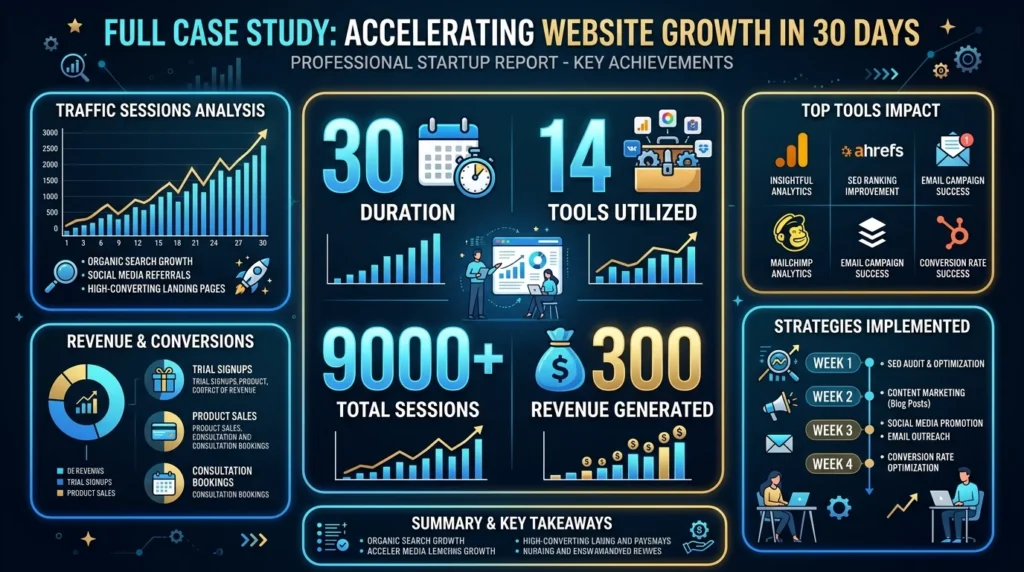
Thirty days. Fourteen tools. Nine thousand sessions. Three hundred and eighteen dollars in month-one revenue from a domain that did not exist five weeks earlier.
Those numbers are not the point of this case study. The point is that every single one of them came from a deliberate, repeatable strategy that anyone with basic JavaScript knowledge and a clear niche can replicate.
The content marketing world in 2026 is louder, more crowded, and more automated than it has ever been. Algorithms are generating articles. AI is filling every informational gap.
The traditional blogger grinding out 2,000-word posts five times a week is now competing against machines that never sleep and never run out of ideas. That race is one most human creators cannot win on volume alone.
A tool-based website does not compete on volume. It competes on utility.
It competes on the single, irreplaceable value of solving one problem completely, instantly, and for free — in a browser tab that closes the moment the user gets what they came for.
That brevity is not a weakness. It is the entire product.
Google’s behavioural signals tell the same story every time: users who interact with tools are more satisfied than users who read articles about the same topic. Satisfaction is the currency search engines trade in now. A tool-based website generates it by design.
What I built in 30 days was not a finished product. It was a foundation.
The fourteen tools live on the site today are the seed of what will eventually be a library of fifty or more. Each one targets a specific transactional keyword. Each one quietly earns ad revenue and affiliate clicks around the clock.
The Website Worth Calculator will grow into a lead generation machine. The Keyword Idea Generator will become the entry point for a premium research product. The Word Counter will anchor a full suite of content creator tools.
None of that growth requires publishing another article. It requires building, optimising, and listening to what users actually need when they land on each page.
If there is one thing I want you to take from this entire case study it is this: the best SEO strategy in 2026 is not a content calendar or a link building campaign.
It is a product that works.
A tool-based website is a product. Every page is a product. Every tool is a tiny, self-contained solution to a real problem that real people search for every single day.
Build enough of those solutions and the traffic, the revenue, and the authority follow naturally — not because you gamed an algorithm, but because you genuinely made something useful.
The 30-day window was a constraint I set to force momentum. The actual timeline for building something that compounds is longer and far more rewarding.
Start this week. Build one tool. Publish it. Submit it to Google Search Console. Watch it index. Watch it rank. Then build the next one.
The gap between where you are right now and a live, traffic-generating tool-based website is smaller than you think. This case study exists to prove it.
The Bottom Line
| What we built | 14 client-side JavaScript tools |
|---|---|
| Time to build | 30 days |
| Month 1 sessions | 9,340 |
| Month 1 revenue | $318 |
| Hosting cost | $11 |
| Articles written | 0 |
| Tools still working | 14 of 14 |
| Would I do it again | Without hesitation |
Found this case study useful? Share it with one person who is still grinding out blog posts and wondering why their traffic has plateaued. Then go build your first tool. The best time to start a tool-based website was two years ago. The second best time is today
Ready to Build Your Own Traffic-Generating Machine?
The same tool-based website traffic strategy you just read about is replicable, documented, and open. Start by finding your first tool niche with the Keyword Idea Generator — then build the first tool this week.
More Article
How Pay Per Call Affiliate Marketing Works (With Real Examples)
Affiliate marketing has evolved far beyond earning commissions from product...
Read More
Most Profitable SaaS Niches in 2026 | 21 High-Growth Markets Worth Entering
SaaS Growth Strategy The global SaaS market is on a...
Read More
How SaaS Websites Make Money | 15 Proven Monetization Methods in 2026
Website Monetization & Flipping Software as a Service (SaaS) has...
Read More
Pay Per Call Marketing Exposed | 5 Powerful Steps to Effortlessly Generate High-Ticket Leads
Website Monetization & Flipping You’ve probably heard that display ads...
Read More
15 Website Monetization Strategies That Actually Work in 2026
Website Monetization & Flipping You have spent months finding keywords,...
Read More
Best SEO Tools for Agencies in 2026 | Rank Higher, Work Faster, Scale Smarter
Introduction Running a digital agency in 2026 without the right...
Read More
7 Link Building Strategies That Increase Organic Traffic and Rankings in 2026
Here is a question every website owner, SEO professional, and...
Read More
Website Monetization in 2026 | The Ultimate AI-Powered Strategy to Turn Traffic into Profit
Introduction You’re getting visitors. Maybe hundreds a day, maybe thousands....
Read More
How to Grow SaaS Revenue Without New Customers | 4 Proven Expansion Strategies
SaaS Growth Strategy 2026 Expansion & Upsell Strategies | Complete...
Read More
How to Grow a Tool Website to 10K Monthly Visitors Using Only Free Traffic Channels
You built the software. You launched the platform. Maybe you...
Read More